
More Features
Generate Short Links for Posts, Pages & Custom Post Types in Bulk
Why Generate Short Links in Bulk?
Efficient Workflow Management
- Save Time: Creating short links simultaneously for multiple items beats generating them individually, particularly benefiting sites with substantial content libraries.
- Consistency: Guaranteeing all relevant material includes short links enhances tracking and distribution while minimizing missed posts.
Improved SEO and Sharing
- SEO Benefits: Condensed URLs improve user experience and allow customization for keyword optimization, boosting content visibility.
- Enhanced Sharing: Shorter links are more shareable across social networks and email, driving greater audience interaction.
Centralized Management
- Single Process: Operate your links from the WordPress admin panel, maintaining streamlined organization.
- Custom Post Types: The feature works with specialized content types, ensuring comprehensive coverage.
How to Generate Short Links in Bulk
Step 1: Access the WordPress Admin Dashboard
- Log in to your WordPress admin dashboard.
- Go to Posts, Pages, or any Custom Post Type section where you need short links.
Step 2: Select Items for Bulk Action
- Check boxes beside the items requiring short links.
- Use the top select-all checkbox to include all items on the current page.
Step 3: Choose the Bulk Action
- Access the Bulk Actions dropdown and select Generate Short Link.
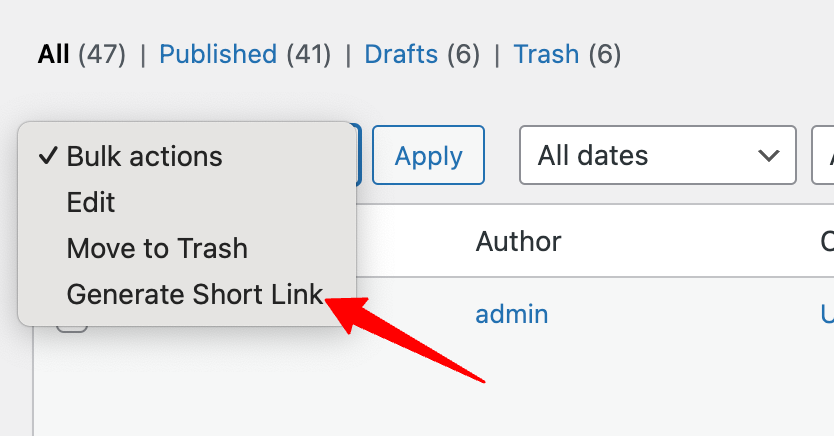
Step 4: Apply the Bulk Action
- Select the Apply button adjacent to the dropdown.
- The system processes and creates short links for your selections.
Step 5: Review Generated Short Links
- Examine the newly created short links in the Short Link column.
- Activate the column via Screen Options if necessary.
Note: This feature is available in URL Shortify PRO