
Advanced Features
Auto-Inject Amazon Affiliate Tags on Short Links
If you promote Amazon products through your content, you probably know the pain of remembering to append ?tag=yourtag-20 every time you share a link — and the bigger pain when you forget and earn nothing on a click you worked hard for.
URL Shortify's Amazon Affiliate Tags feature does this for you, automatically and per region. Set your tag once per Amazon storefront, and every short link pointing at Amazon will redirect through with the correct affiliate tag attached.
How It Works
When someone clicks a short link whose destination is an Amazon URL, URL Shortify:
- Detects the Amazon region from the URL's host (e.g.
amazon.com,amazon.co.uk,amazon.de). - Looks up the affiliate tag you've configured for that region.
- Strips any existing
tag=parameter from the URL to avoid conflicts. - Appends your tag and redirects the visitor to the tagged destination.
Visitors land on the same Amazon product page — only with your affiliate attribution attached. The tag swap happens server-side in the redirect, so there's no client-side flash or extra hop.
Supported Amazon Regions
URL Shortify detects and tags links across all major Amazon storefronts:
| Region | Domain |
|---|---|
| United States | amazon.com |
| India | amazon.in |
| United Kingdom | amazon.co.uk |
| Germany | amazon.de |
| France | amazon.fr |
| Spain | amazon.es |
| Italy | amazon.it |
| Japan | amazon.co.jp |
Each region has its own tag field, so a US affiliate tag never gets attached to a German link (which would earn you nothing and look wrong).
Setup
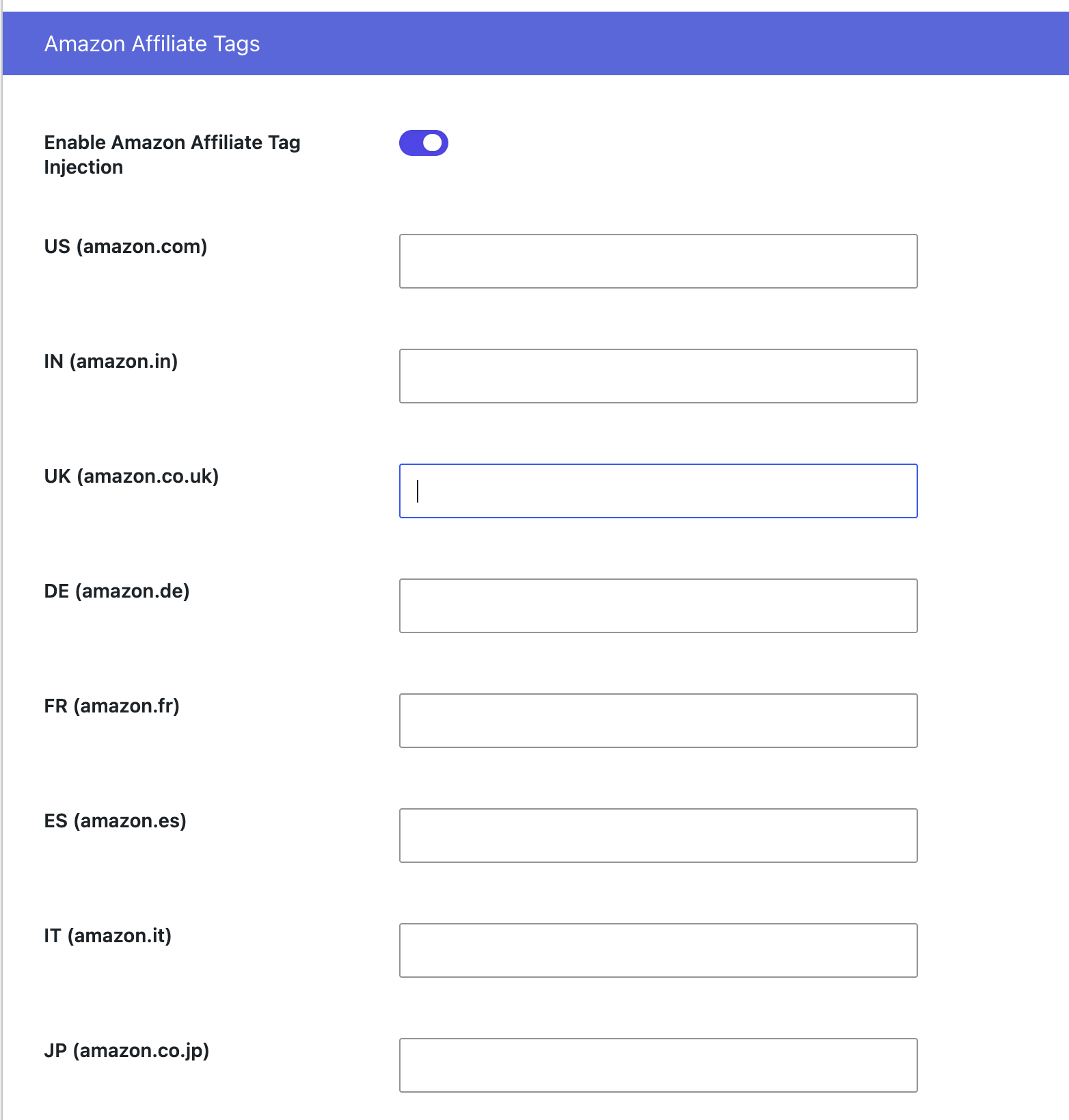
Step 1 — Open the Settings
Go to URL Shortify → Settings → Integrations tab and find the Amazon Affiliate Tags section.
Step 2 — Enable the Feature
Toggle Enable Amazon Affiliate Tag to On.
Step 3 — Add Your Tags
For every Amazon Associates storefront you're registered with, paste your tag into the matching field:
| Field | Where to find your tag |
|---|---|
| Amazon US Tag | Amazon Associates Central → Account Settings → Tracking IDs |
| Amazon India Tag | Amazon Associates India → Account Settings → Tracking IDs |
| Amazon UK Tag | Amazon Associates UK → Account Settings → Tracking IDs |
| Amazon Germany Tag | Amazon.de Partnernet → Konto-Einstellungen |
| Amazon France Tag | Club Partenaires Amazon → Paramètres |
| Amazon Spain Tag | Amazon Afiliados → Configuración |
| Amazon Italy Tag | Programma di Affiliazione → Impostazioni |
| Amazon Japan Tag | Amazon アソシエイト → アカウント設定 |
Tags usually look like yourname-20, yourname-21, or similar. Paste only the tag value — no ?tag=, no URL fragments.
Leave a region blank if you don't have an account there. Links to that storefront will pass through unmodified instead of being tagged with an invalid value.
Step 4 — Save
Click Save Settings. From the next click onward, every Amazon short link is tagged automatically.
Verifying It Works
The easiest way to confirm tagging is happening:
- Create a short link pointing at any Amazon product URL (e.g.
https://www.amazon.com/dp/B08N5WRWNW). - Open the short link in a browser.
- Once the page loads, check the final URL in the address bar — you should see
?tag=yourtag-20(or whatever you configured) appended.
If the destination URL already contained a tag= parameter, URL Shortify replaces it with yours — your affiliate attribution always wins.
Opting Out for a Specific Link
Sometimes you don't want a particular Amazon short link to carry your tag — maybe you're linking to a competitor's product as a comparison, or you want to test a non-affiliate variant. You can opt out per link with a one-line filter in your theme or a custom plugin:
add_filter( 'url_shortify_apply_amazon_tag', function( $apply, $url ) {
    // Disable tag injection on a specific destination URL.
    if ( false !== strpos( $url, '/dp/B08N5WRWNW' ) ) {
        return false;
    }

    return $apply;
}, 10, 2 );
You can also override the matched tag entirely with the url_shortify_amazon_affiliate_tag filter, or override the detected region with url_shortify_amazon_region.
When Should You Use This?
- Affiliate marketing sites — every product mention becomes a revenue opportunity without manual tag hygiene.
- Multi-region campaigns — promote the same product to UK and US audiences from a single short link without managing duplicate URLs.
- Agencies running affiliate programs for clients — set the client's tag in URL Shortify and every short link inherits it.
- Content creators with social-first traffic — your bio link or pinned post can point to a clean short URL while still earning commissions.
Best Practices
- Update your tags annually. Amazon Associates rotates tracking IDs in some regions; check yours once a year.
- Verify compliance. Most Amazon Associate programs require an affiliate disclosure on the linking page. URL Shortify tags your links, but you're still responsible for disclosing the affiliate relationship.
- Use the Link Activity reports to see which Amazon links are getting clicks. Combine that with Amazon's own reporting to attribute revenue back to specific posts or campaigns.
- Avoid double tagging. If you're using another affiliate plugin alongside URL Shortify, disable Amazon tag injection in one of them to prevent conflicting
tag=parameters.
Amazon Affiliate Tags is available in URL Shortify PRO.