
What's New in URL Shortify Since 2.0 — A Complete Feature Tour
What's New in URL Shortify Since 2.0 — A Complete Feature Tour
When we shipped URL Shortify 2.0 back in early March 2026, we set out to turn a solid link-shortening plugin into a proper link management platform for WordPress. In the weeks since, we've pushed several meaningful updates — 2.0, 2.1, 2.2, 2.2.2, and 2.3 — each one adding something our community has been asking for.
This post is a complete tour of everything that has landed since 2.0. Whether you're a marketer running campaigns, an agency managing links across dozens of client sites, or a content creator who just wants cleaner analytics, there's something here for you.
Let's dive in.
2.0 — The Foundation Release
Version 2.0 was our biggest release in plugin history, introducing five headline features that changed how you work with URL Shortify.
1. Broken Link Checker (PRO)
Short links are supposed to be evergreen. Until they're not. Destinations change owners, pages get deleted, sites go offline — and suddenly the QR code you printed on a flyer six months ago is leading people to a 404.
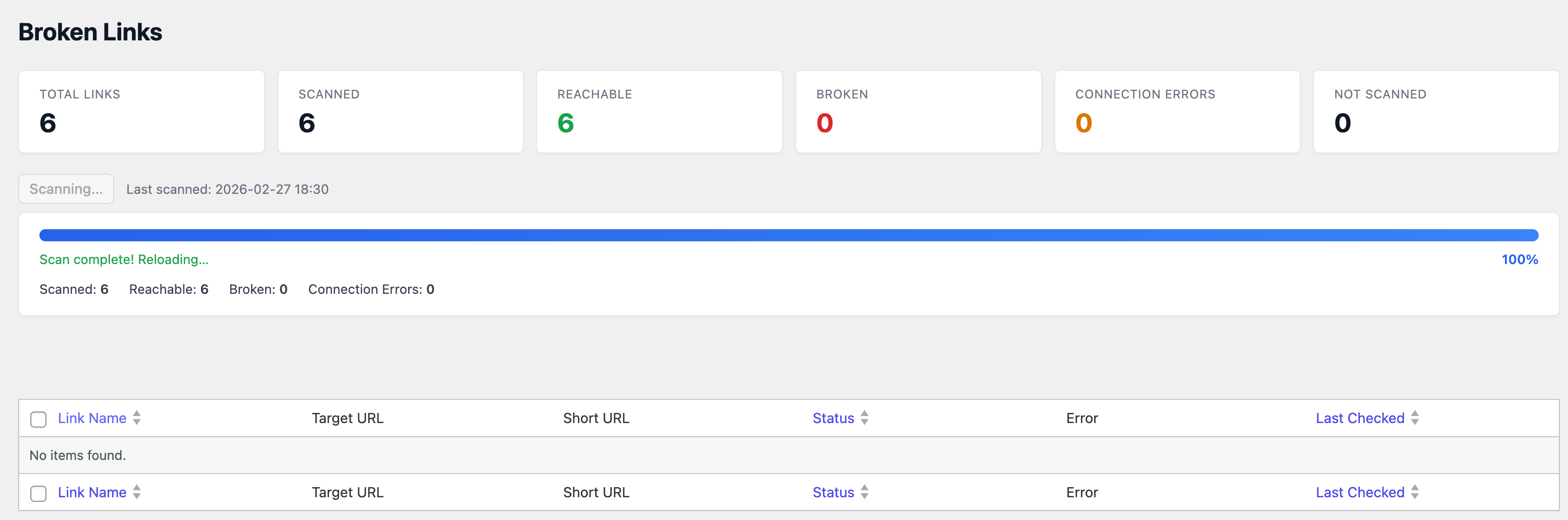
The Broken Link Checker runs in the background and periodically tests every short link's destination URL. When a link returns a broken status (404, 500, DNS failure, etc.), it surfaces in a dedicated "Broken Links" report so you can fix or retire it before your audience hits the dead end.
Benefits:
- Catch dead destinations before your visitors do — protecting brand trust.
- Stop losing traffic and conversions to silently-broken redirects.
- Bulk-fix or replace broken links from a single dashboard instead of hunting through content.
2. Auto Link Keywords (PRO)
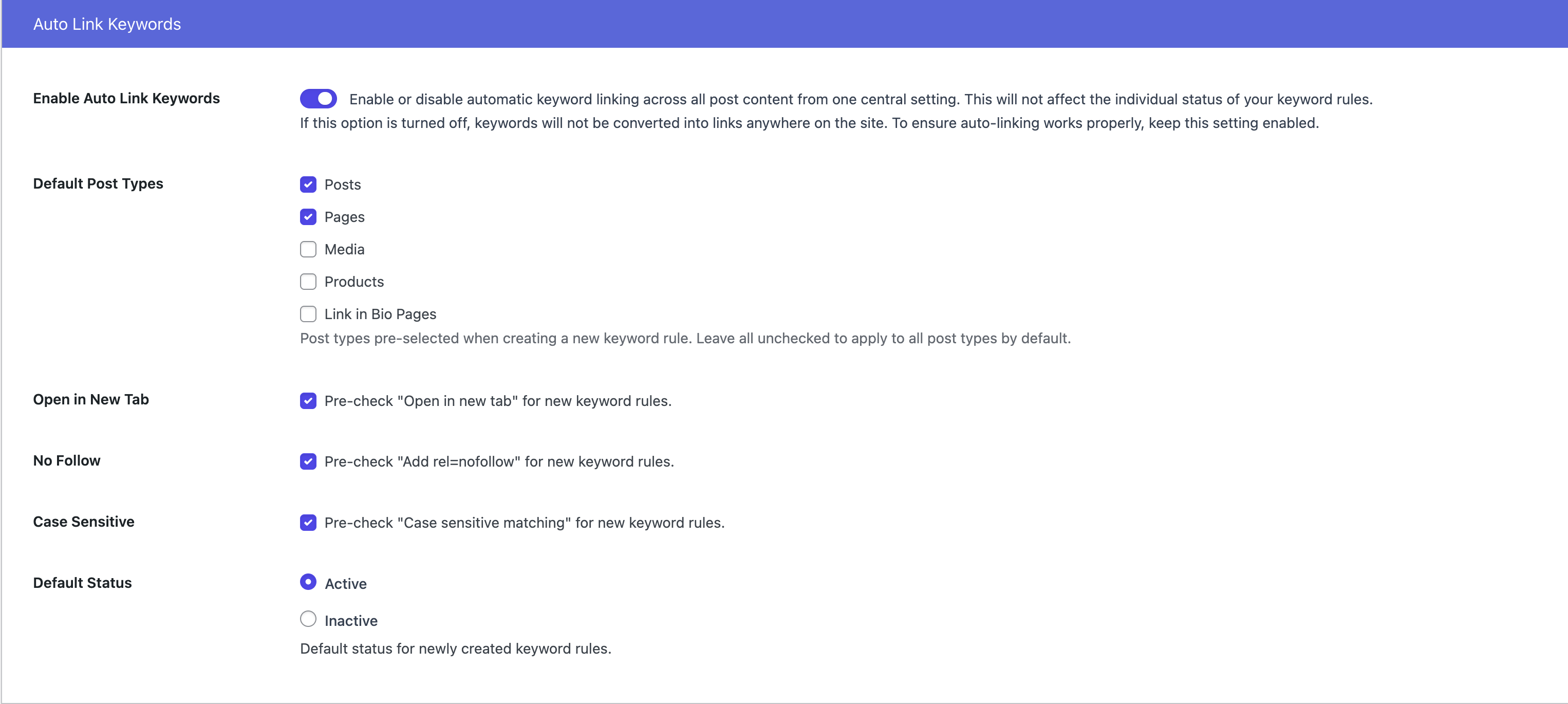
If you run a content-heavy site, you know the pain of manually inserting affiliate or tracked short links into every new blog post. Auto Link Keywords lets you define keyword → short-link mappings once, and the plugin will automatically convert matching keywords in your posts into your short link — retroactively on existing content and automatically on new content.
Benefits:
- Save hours of manual link insertion across long-form content libraries.
- Ensure consistent attribution — every mention of "our pricing page" becomes the same tracked short link.
- Update the destination in one place and have it propagate everywhere the keyword appears.
3. Splash Page (PRO)
A splash page sits between the click and the final destination — a branded interstitial where you can display a logo, a short message, a countdown, or a call to action before sending the visitor onward. It's commonly used for affiliate disclosures, age verification, promotional messaging, or simply for branding reinforcement.
Benefits:
- Build brand recognition on every click instead of handing visitors straight off to the destination.
- Satisfy legal disclosure requirements (affiliate links, age gates) without modifying the destination.
- Use the interstitial moment to cross-promote other offers, newsletters, or products.
4. Email Digest
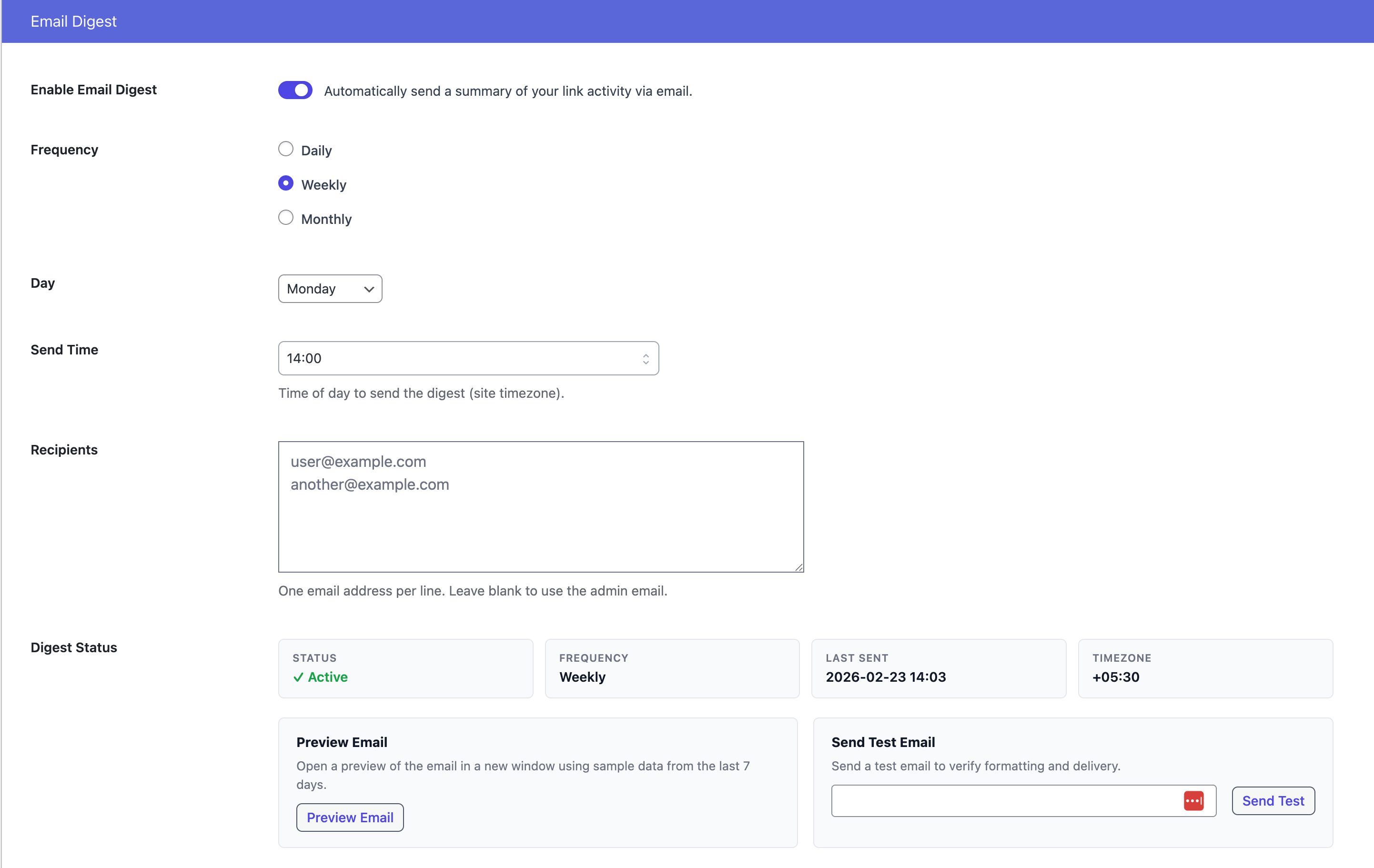
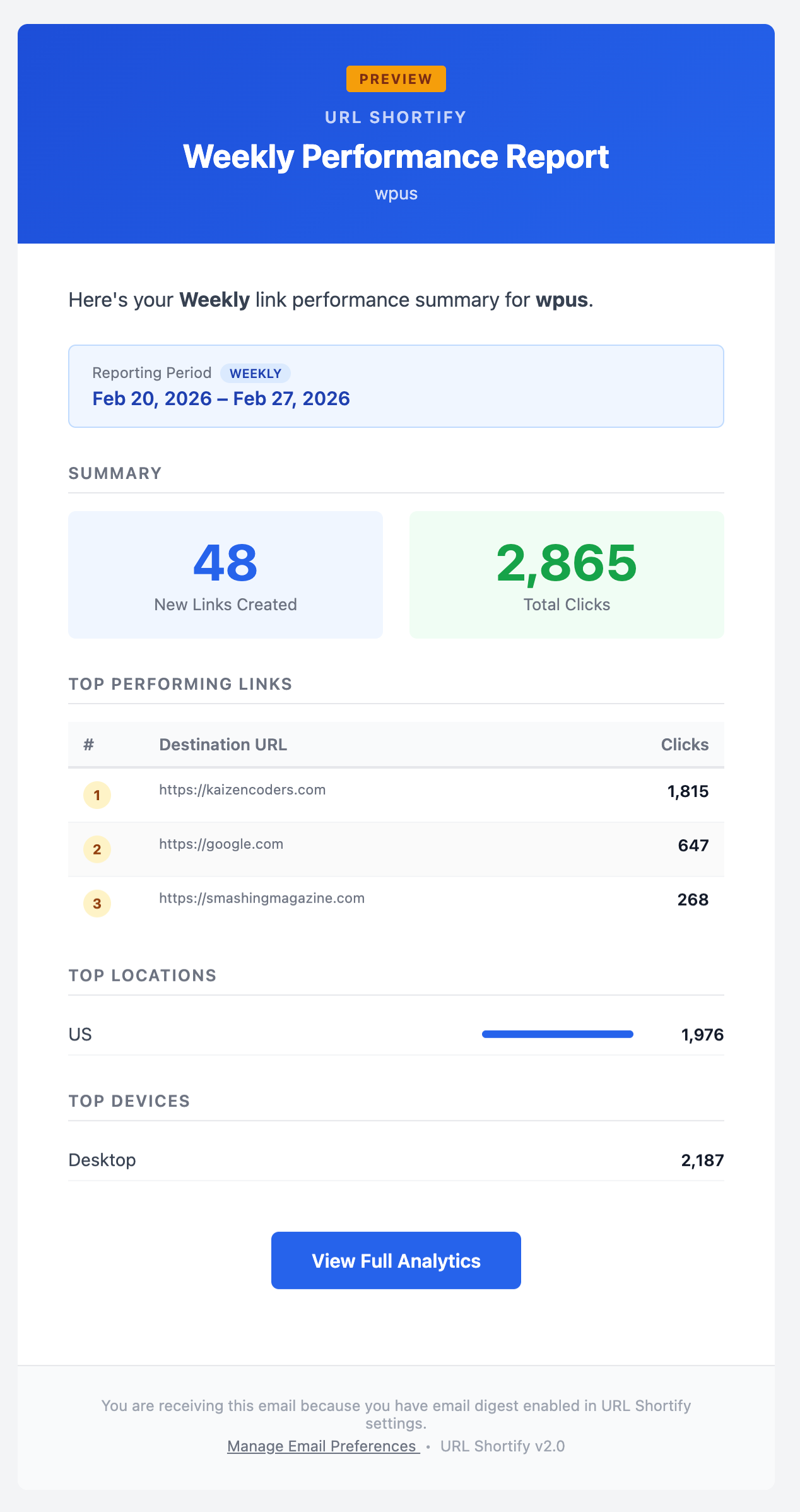
Analytics only help if you actually look at them. The Email Digest sends you (and any additional recipients you add) a scheduled summary of what's happening with your links — new links created, click activity, top performers — delivered right to your inbox on a daily, weekly, or monthly cadence.
Benefits:
- Stay on top of link performance without ever opening the dashboard.
- Share performance visibility with stakeholders and clients automatically.
- Spot anomalies — a sudden spike or drop — the moment they happen instead of at the end of the month.
5. REST API (PRO)
For developers and power users, 2.0 shipped a full REST API covering every major resource — Links, Groups, Tags, Domains, UTM Presets, Tracking Pixels. Authenticate with an API key and you can create, read, update, or delete records programmatically.
Benefits:
- Integrate URL Shortify with any external tool — Zapier, n8n, internal scripts, mobile apps.
- Automate link creation as part of your content publishing workflow.
- Build custom dashboards or reports that pull data from URL Shortify without touching the WP admin.
REST API reference documentation
2.1 — A Small But Meaningful Email Digest Upgrade
2.1 was a smaller release focused on polish, but one update deserves a callout.
Recently Added Links in the Email Digest
The Email Digest now includes a section listing links you've recently created, not just click activity. It closes a gap in the weekly reporting: previously, a link created mid-week wouldn't surface in the digest unless it picked up clicks.
Benefits:
- Confirm that links you (or your team) created are in the system and tracking correctly.
- Give clients visibility into the volume of work being done, not just results.
- Spot test links that should probably be cleaned up before they leak into production reporting.
2.2 — A/B Testing, Heatmaps, and Dark Mode
Version 2.2 was the "analytics glow-up" release. It added two major analytics capabilities and finally brought a long-requested UI feature: dark mode.
1. A/B Testing (PRO)
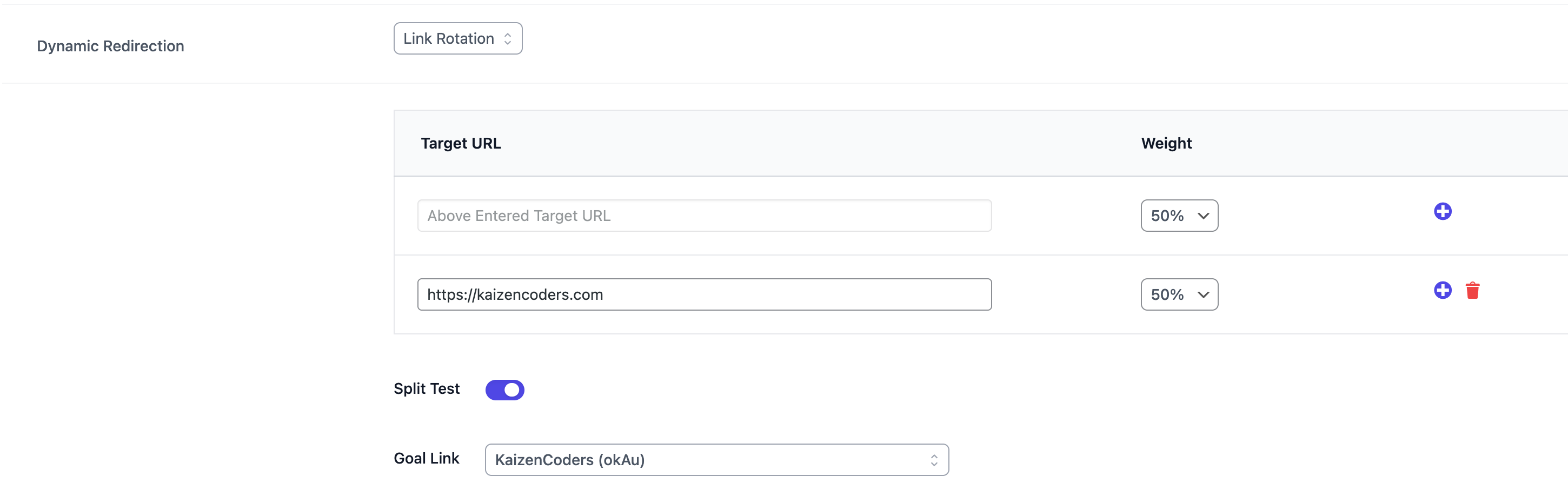
Not sure whether landing page A or landing page B will convert better? Now you don't have to guess. URL Shortify's A/B Testing lets you point a single short link at two or more destination URLs, and the plugin will split traffic between them — either evenly or on a weighted split you define.
Results are displayed right on the Link Stats page: total clicks per variant, unique clicks, conversion-ready metrics, and a clear winner indicator.
Benefits:
- Test headline, landing page, or offer variations with zero development work.
- Get data-driven confidence that you're sending traffic to the better-converting option.
- Split-test across campaigns without needing separate links — one short link, multiple destinations, clean data.
2. Clicks Heatmap on the Dashboard (PRO)
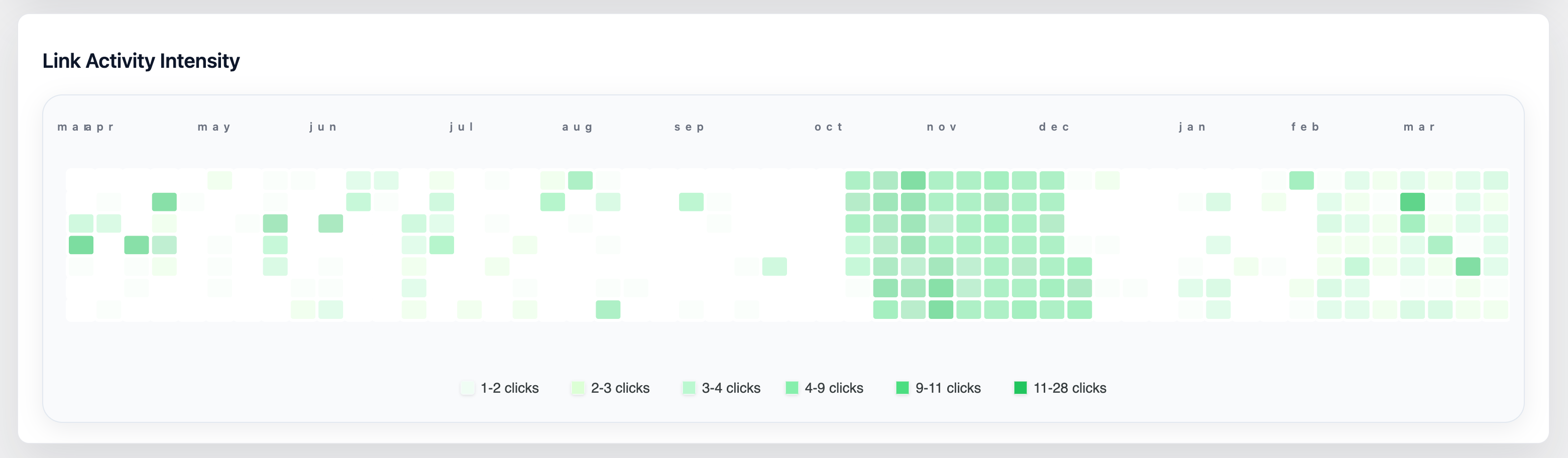
The new clicks heatmap visualizes click volume by time of day and day of week. You see at a glance when your audience is most active — is it Tuesday mornings? Weekend evenings? A consistent afternoon spike regardless of weekday?
Benefits:
- Time your social posts, email blasts, and ad campaigns for the hours when your audience is most responsive.
- Validate — or challenge — assumptions about when your traffic peaks.
- Use the heatmap alongside the total clicks chart to separate volume trends from timing patterns.
3. Dark Mode
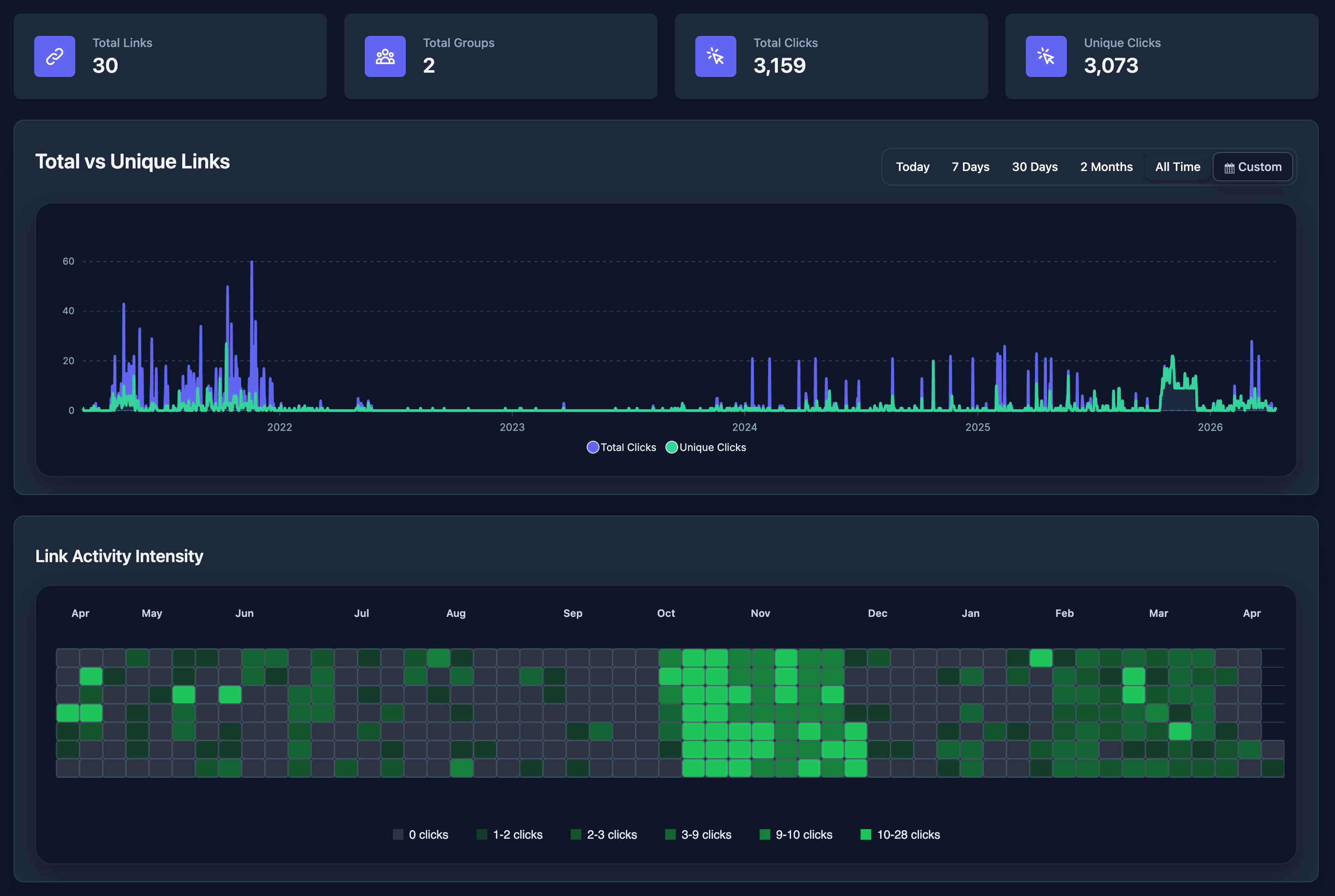
A simple but long-requested feature. The entire plugin UI — dashboard, link editor, stats pages, settings — now has a polished dark theme that follows your WordPress admin theme preferences.
Benefits:
- Reduce eye strain if you spend long hours in the WP admin.
- A consistent, modern look that matches how you've already themed the rest of your admin.
- No extra setting — it just works based on your existing WordPress preference.
2.2.2 — Link-Level Analytics Gets Richer
2.2.2 focused on giving you more control and insight at the individual link level.
1. Enable / Disable Short Links (PRO)
Sometimes you need to temporarily pause a link — a promotion ended, a destination is under maintenance, or you simply want to stop traffic flowing without deleting the link and losing its history.
The new enable/disable toggle lets you pause any link with a single click. Disabled links stop redirecting but retain all their analytics history, and can be re-enabled at any time.
Benefits:
- Take links offline without permanently deleting them (and losing analytics).
- Run time-bound campaigns and disable the link the moment they end.
- Troubleshoot destination issues without breaking the short link entirely.
2. Link Activity Intensity Report (Per Link) (PRO)
Think of the clicks heatmap from 2.2 — but zoomed in to a single link. The Link Activity Intensity report gives you a GitHub-style contribution graph showing click density over the past year for any individual link.
Benefits:
- Understand the lifecycle of a single link — did it spike on launch day and fade, or does it have a steady long-tail?
- Identify seasonality (holiday-season spikes, Q4 patterns) for evergreen links.
- Prove the ongoing value of older content links to stakeholders by visualizing sustained activity.
3. Custom Date Range Filter on Link Stats (PRO)
Until now, Link Stats offered fixed windows — Today, Last 7 Days, Last 30 Days, Last 60 Days, All Time. 2.2.2 added a Custom option where you can pick any start and end date.
Benefits:
- Align stats exactly to campaign start/end dates for precise reporting.
- Exclude your own testing period from reports by starting from the launch date.
- Compare two arbitrary periods (e.g., "this month vs. same month last year") by running two separate exports.
2.3 — Groups, Tags, and Bulk Power Tools
2.3 is the most recent major update, and it's a big one. If you manage dozens or hundreds of links, this release will dramatically change how efficiently you can work.
1. Link Activity Intensity in Groups & Tags Stats (PRO)
The activity heatmap from 2.2.2 is now also available on the Group Stats and Tags Stats pages — aggregating all links in the group (or with that tag) into a single heatmap.
Benefits:
- Analyze a campaign as a whole (all its links) instead of one at a time.
- Spot patterns across thematically-related links — e.g., "affiliate links spike on weekends, product links spike on weekdays."
- Give clients a clean "campaign heatmap" view without exposing the individual link breakdown.
2. Tags Stats Page (PRO)
Tags got their own dedicated stats page, mirroring the structure of Group Stats: total clicks, unique clicks, time-series chart, device/browser/country/referrer breakdowns, activity heatmap, and the Click History table — all filtered to links carrying that tag.
Benefits:
- Slice analytics by an orthogonal dimension to groups — e.g., tag links by campaign type ("affiliate", "partner", "social") regardless of which group they live in.
- Report on cross-cutting themes without restructuring your link organization.
- Compare tag performance side-by-side by opening multiple tag-stats pages.
3. Custom Date Range in Group Stats (PRO)
Same feature as custom date filtering on Link Stats, but for Groups. Now available on both Group Stats and (as of 2.3) Tag Stats.
Benefits:
- Report on a group's performance over an arbitrary period — not just rolling windows.
- Generate tight, campaign-scoped reports for clients.
- Exclude setup/testing noise by starting from the campaign go-live date.
4. Bulk Update Link Status (PRO)
Building on the per-link enable/disable toggle from 2.2.2, you can now select multiple links in the Links listing and enable or disable them all in one action.
Benefits:
- End a campaign in one click — disable every link that was part of it, en masse.
- Re-enable a whole batch of seasonal links when the season rolls around again.
- Save hours when managing large link portfolios.
5. Filter Links by Status (PRO)
Find just your active links, or just your disabled ones. The new status filter sits alongside the existing search and filter controls on the Links listing.
Benefits:
- Quickly audit which links are currently live vs. paused.
- Build reports that include only active links, without post-filtering in a spreadsheet.
- Spot disabled links that may have been disabled long ago and should be deleted or re-enabled.
6. Link Status, Groups, and Tags in CSV Export (PRO)
Export now includes three additional columns: Status (enabled/disabled), Groups (comma-separated group names), and Tags (comma-separated tag names).
Benefits:
- Get a complete snapshot of your link configuration in a single file — no need to cross-reference multiple exports.
- Migrate or audit link setups between environments with full fidelity.
- Analyze your link taxonomy in a spreadsheet: "how many links are tagged 'affiliate' AND in the 'Q2 Campaign' group?"
7. Import Tags (PRO)
The CSV import feature now supports tags. If your CSV has a Tags column, URL Shortify will automatically create the tags (if they don't already exist) and associate them with the imported links.
Benefits:
- Bulk-migrate tagged link libraries from other tools (Bitly, Rebrandly, a spreadsheet) without manually tagging each link.
- Onboard new team members by handing them a CSV with the complete link + tag structure.
- Keep tags consistent across large imports — the importer creates tags once and reuses them across all rows.
8. Most Important: The newly branded KaizenCoders Knowledge Base
The KaizenCoders Knowledge Base is now the central hub for all documentation, guides, and support resources for all our products. It's been redesigned for easier navigation and a better reading experience.
And yes, it has a dedicated section for changelogs — so you can see every update, big or small, in one place. It's beautifully crafted!.
Check it out at docs.kaizencoders.com and bookmark it for all your URL Shortify needs.
Putting It All Together
If you stack everything that's shipped since 2.0, URL Shortify now gives you:
- A complete link lifecycle — create links via UI, REST API, or CSV import; organize them with groups and tags; pause or resume them with enable/disable; audit broken destinations with the checker.
- Deep analytics — click totals, unique clicks, activity heatmaps, geographic and device breakdowns, referrer analysis, custom date ranges — available per link, per group, and per tag.
- Experimentation and optimization — A/B test destinations, track splash-page conversions, and use auto link keywords to scale tracked links across content.
- Automation and integration — REST API for programmatic access and scheduled Email Digests to keep everyone informed without logging into the dashboard.
- Scalable workflows — bulk status updates, rich CSV exports and imports, and filtering tools that make managing hundreds of links practical rather than painful.
We've tried to keep every new feature opt-in or unobtrusive. If you've been using URL Shortify as a simple link shortener, it still works exactly the same. Everything new sits a click or two deeper in the UI, waiting for when you need it.
What's Next
We're already working on the next set of updates based on community feedback. If there's a feature you'd love to see, we read every feature request and support ticket — drop us a line and let us know what would make URL Shortify work even better for you.
Until then, go check out the features above. Our guess is that at least one of them will save you real time this week.
Upgrade To URL Shortify PRO
If you haven't already, Upgrade to PRO to unlock all the features mentioned in this post and take your link management to the next level.