
URL Shortify 2.4.0 — See What Every Link Leads To, and Migrate Without the Headache
URL Shortify 2.4.0 — See What Every Link Leads To, and Migrate Without the Headache
There's a moment everyone who manages a lot of short links knows. You're scrolling through your link list, looking at slugs like /promo-q3, /aff-banner-2, /landing-rev3, and you stop — wait, which one of these is the partner offer? Is landing-rev3 actually pointing at the new page, or did I update the wrong one yesterday?
You click the link, wait for it to load, realise it's the right one, close the tab, and go back. Multiply that by twenty checks a week and it adds up to real time. Worse, when you skip the check and don't verify, you ship something pointing at the wrong destination.
URL Shortify 2.4.0 is largely about removing those small drags from your day. Here's what's new and what it means for you.
See What Each Link Leads To — Without Leaving the Page
Open the Links page, hover any row, and you'll find a new Preview action. Click it, and a card appears showing exactly what that short link's destination looks like — the page title, the description, the preview image, the source site. The same card your audience would see if you shared the link on social media.
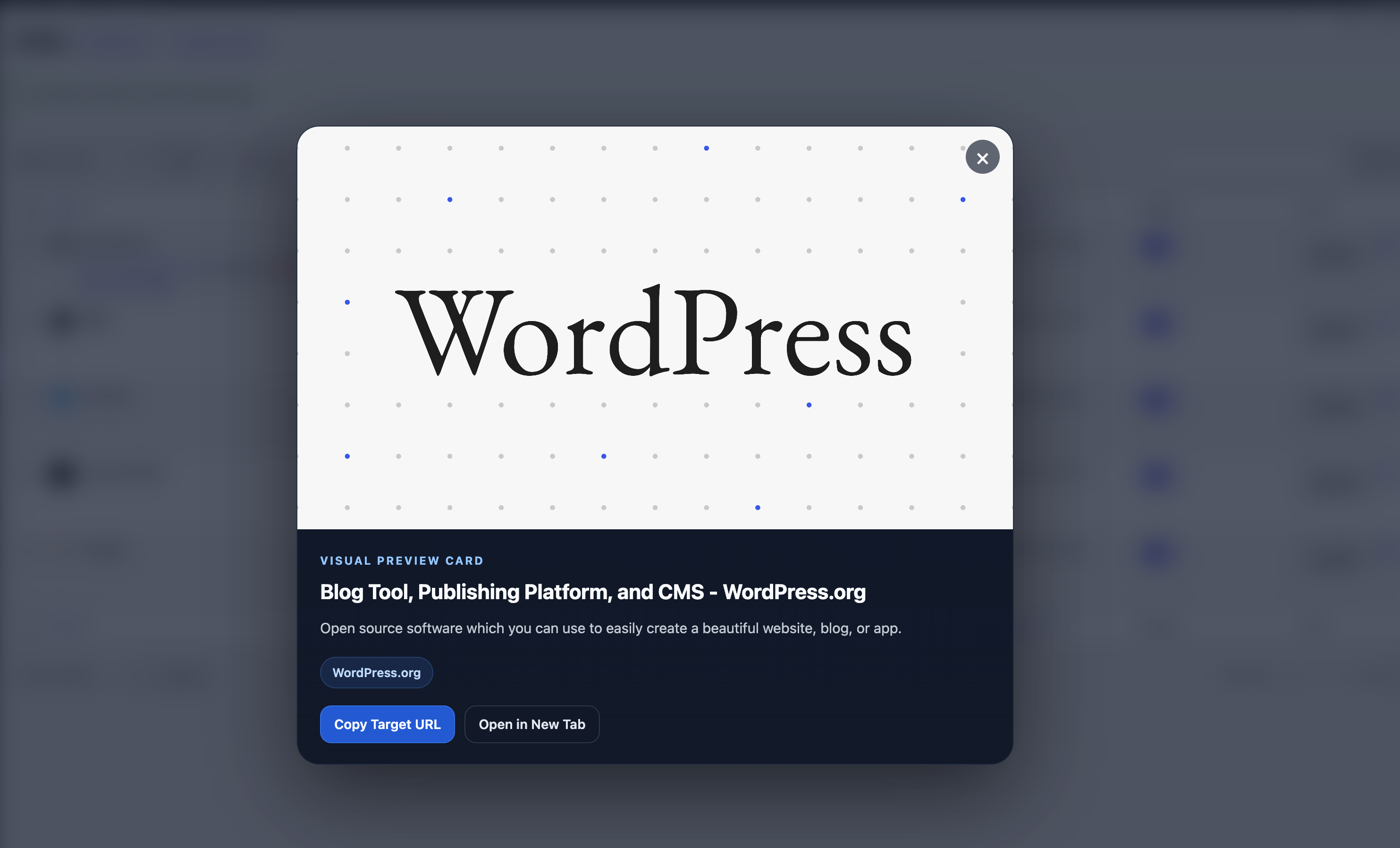
No more opening tabs to verify destinations. No more squinting at slugs trying to remember which campaign they belong to. One click, one glance, done.
Where this saves you the most time:
- Before a campaign launch. You've got fifteen short links queued for an email send. Open each one's preview, eyeball the destination, move on. What used to be a ten-minute tab-juggling session becomes a one-minute scroll.
- For affiliate and partner links. Affiliate URLs like
https://partner.example.com/?aid=xyz&pid=1234tell you nothing about the actual product. The preview shows you the real landing page, so you can confirm you're sending traffic to the right offer. - When verifying a migration. Just brought 800 links over from another plugin? Spot-check a few previews to confirm destinations are intact. Far faster than clicking through each one.
- When auditing old links. You spot a high-traffic link from a campaign you barely remember. Preview it — instantly recognise where it leads — decide whether to keep it, update it, or retire it.
The preview opens in under a second on repeat checks, because URL Shortify remembers what it saw the first time. And the whole feature works on Lite and PRO — no upgrade needed to use it.
Migrations That Actually Feel Finished
If you've ever migrated from another link-management plugin — Pretty Links, Thirsty Affiliates, Link Central, anything similar — you know the after-migration awkwardness. The links are in your dashboard now, mixed in with everything else, and you have to figure out which are which if anything goes wrong.
In 2.4.0, every one-click migration automatically creates a group named after the source plugin and drops every imported link into it.
So after a Thirsty Affiliates migration, you've got a clear Thirsty Affiliates group containing every single link that came across. After Pretty Links, a Pretty Links group. After Link Central, a Link Central group.
That small change makes a huge difference:
- Verifying the migration is a single click. Open the group, count the links, scan the destinations.
- Rolling back is clean. Decide the migration didn't go well? Delete the group, and every imported link goes with it — nothing else touched.
- Comparing performance is meaningful. See how migrated links perform alongside your native ones, side by side.
- Bulk-editing migrated links — updating their nofollow status, expiry dates, or destinations — happens in a single batch instead of one-by-one filtering.
If your source plugin used categories or tags, those still come over as their own groups too. So a Thirsty Affiliates link tagged "Electronics" ends up in both the Thirsty Affiliates group and the Electronics group. You get organization by source and organization by topic, automatically.
Link Central Migrations Just Got Dramatically Faster
For anyone migrating from the Link Central plugin specifically: this used to be one of the slower one-click imports. Large catalogs — a few thousand links — could take minutes to migrate, with the progress bar crawling.
The Link Central importer in 2.4.0 finishes in a fraction of the time. Same step-by-step progress display, same idempotent rerun support (you can safely restart a partial migration), same UI. Just dramatically faster underneath.
If you've been putting off migrating thousands of Link Central links because the wait felt impractical, that excuse is gone now. Run it, walk away, come back to a finished migration.
A PRO Feature Worth (Re-)Discovering: Amazon Affiliate Tags
While we're talking about getting more out of your short links, there's a PRO feature that's been quietly powering affiliate workflows for a while now — and we've just published a proper guide for it.
If you promote Amazon products, you know the manual tax of remembering to append ?tag=yourtag-20 to every Amazon URL you share. Forget once, and that click earns you nothing.
Amazon Affiliate Tags does this automatically. Set your Associates tracking ID once per region — US, UK, India, Germany, France, Spain, Italy, Japan — and every short link pointing at Amazon gets the correct regional tag attached at redirect time. No manual tagging, no wrong-region tags, no forgotten attribution.
It pairs beautifully with the new auto-grouped imports: migrate a Thirsty Affiliates catalog full of Amazon links, set your regional tags once, and overnight every imported link starts earning correctly — across every Amazon storefront your audience uses.
If you're running affiliate campaigns and didn't know this existed, this is a five-minute setup that pays for the PRO license many times over. Read the Amazon Affiliate Tags guide →
What This Adds Up To, in Your Day
A few scenarios where 2.4.0 changes something concrete:
The agency manager with 200 client short links across five campaigns. Before: tab-juggling to verify each destination during weekly QA. After: scroll through, open previews where slugs are ambiguous, done in a fraction of the time.
The affiliate marketer migrating five years of Thirsty Affiliates links into URL Shortify. Before: a tense afternoon hoping the migration worked correctly, followed by spot-checking by clicking through links. After: a Thirsty Affiliates group with every link inside, previews to confirm destinations, clear rollback path if anything looks wrong — and if Amazon Affiliate Tags is enabled, every migrated Amazon link starts earning under the right regional Associates tag from the first redirect.
The content creator writing a roundup post with twelve product short links. Before: open every destination in a new tab to make sure descriptions and product details match what you're writing. After: preview each one inline, copy the descriptions straight from the card.
The e-commerce store owner running flash promotions tied to short links. Before: nervously verifying every campaign link the morning of launch, knowing one wrong destination means lost revenue. After: a confident pre-launch sweep with the preview action — five minutes instead of forty-five.
Quieter Improvements You'll Notice Anyway
Beyond the headline features, 2.4.0 includes a handful of smaller improvements that should make the plugin feel a bit lighter and more polished:
- The Preview feature is fully translation-ready. Every label, every button, every loading message flows through the WordPress translation system, so your non-English users get a fully localised experience as soon as translators catch up.
- Pages load slightly snappier in admin views where URL Shortify wasn't strictly active. We were leaking some markup into pages that didn't need it — that's gone now.
- Some long-standing rough edges in the imports (date timezones, slug duplicates, fallback behaviour) got tidied up as part of the migration improvements.
- A few security improvements to the preview feature so it's safe to use on multisite and shared-hosting environments without worry.
Should You Update?
Yes — and you can do it right now without changing any settings or running any migrations. URL Shortify 2.4.0 is fully backwards-compatible with 2.3.x. Your existing links keep working, your existing groups stay intact, your existing API integrations don't need any changes.
To update, go to WordPress Dashboard → Plugins → Updates in your admin and click update next to URL Shortify. PRO users will see the update in the same place.
If you're on the older Lite version specifically because you didn't want the upgrade friction — there's no friction here. Just additional things you'll find useful.
What's Coming Next
A few things we're already working on based on what you've been asking for:
- Even faster previews — opening a cached preview instantly while quietly refreshing in the background.
- Bulk operations beyond links — bringing the same bulk power to groups and tags.
- Better visualizations on the Tags Stats page — so it matches what Group Stats already offers.
If there's a feature you wish URL Shortify had, tell us about it. We read every request. Multiple features in this release — including the auto-grouped imports and the visual preview — started life as customer messages.
Try It Out
Update to 2.4.0. Open your Links page. Click Preview on a few links. Run an import if you've been meaning to. Then drop us a note and tell us what felt better — or what could still be better.
Thanks for using URL Shortify.
If you want to see the full list of changes, including the smaller fixes and technical improvements, check the 2.4.0 changelog.